Your agent doesn't stop when you do.
Hand off an in-progress session to a cloud sandbox with /teleport and resume it from anywhere. The Kimchi console mirrors your session on your laptop, phone, or wherever you are.
curl -fsSL https://github.com/getkimchi/kimchi/releases/latest/download/install.sh | bash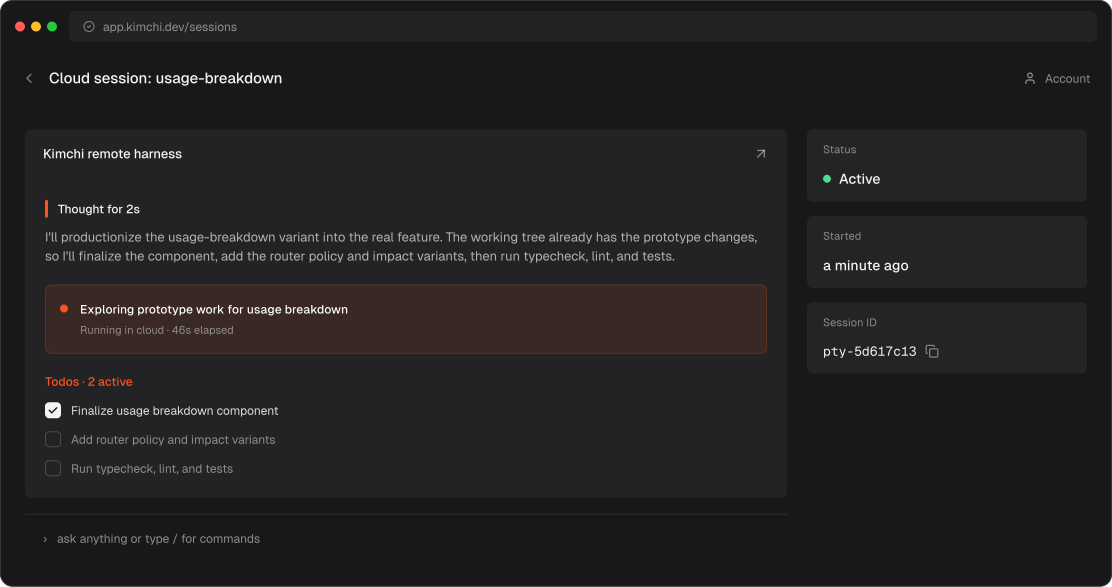

'%3e%3cpath%20fill='%230E0F13'%20d='m11.014%209.826.148.56-.668.448c-.519.374-.815.822-.815%201.345%200%20.449.148.934.408%201.756l2.855%209.041%202.596-7.135-.853-2.317c-.52-1.457-1.075-2.39-1.928-3.138l.148-.56c3.449.224%206.564.224%2010.012%200l.149.56-.779.486c-.52.336-.742.672-.742%201.233%200%20.448.149.971.408%201.755l2.967%209.116%202.373-6.313c.297-.822.408-1.42.408-2.13%200-1.382-.816-2.69-2.559-4.147l.149-.56c2.484.186%204.969.186%207.453%200l.149.56c-1.632%201.494-2.633%203.026-3.746%205.94l-4.969%2013.076a30.71%2030.71%200%200%200-3.708%200l-4.116-11.245-4.08%2011.245a33.213%2033.213%200%200%200-3.856%200l-5.97-15.728c-.78-2.018-1.187-2.54-2.448-3.288l.148-.56c3.672.224%207.194.224%2010.866%200ZM42.126%2030c-6.378%200-10.42-4.11-10.42-10.349S36.008%209.303%2042.238%209.303c5.785%200%209.79%203.4%2010.383%209.04H39.234c.222%204.67%202.41%206.65%206.304%206.65%202.3%200%204.487-.746%206.193-2.054l.556.41C50.693%2027.46%2046.873%2030%2042.127%2030Zm-2.93-13.113h6.342c-.297-4.708-1.557-6.202-3.263-6.202-1.892%200-3.004%201.83-3.078%206.202Zm23.586-7.061.148.56-.667.448c-.52.374-.816.822-.816%201.345%200%20.449.148.934.408%201.756l2.855%209.041%202.596-7.135-.853-2.317c-.52-1.457-1.075-2.39-1.928-3.138l.148-.56c3.449.224%206.564.224%2010.012%200l.149.56-.779.486c-.52.336-.742.672-.742%201.233%200%20.448.149.971.408%201.755l2.967%209.116%202.373-6.313c.297-.822.408-1.42.408-2.13%200-1.382-.816-2.69-2.559-4.147l.149-.56c2.484.186%204.969.186%207.453%200l.149.56c-1.632%201.494-2.633%203.026-3.746%205.94l-4.969%2013.076a30.711%2030.711%200%200%200-3.708%200l-4.116-11.245-4.08%2011.245a33.214%2033.214%200%200%200-3.856%200l-5.97-15.728c-.78-2.018-1.187-2.54-2.448-3.288l.148-.56c3.672.224%207.195.224%2010.866%200Zm31.817-.523c6.453%200%2011.125%204.11%2011.125%2010.348%200%206.24-4.747%2010.349-11.2%2010.349C88.073%2030%2083.4%2025.89%2083.4%2019.651S88.147%209.303%2094.6%209.303Zm-3.449%209.601c0%206.277%201.113%209.639%203.597%209.639%202.003%200%203.227-1.644%203.227-8.145%200-6.5-1.113-9.638-3.597-9.638-2.003%200-3.227%201.643-3.227%208.144Zm14.982%2010.536-.148-.56%201.446-.785c1.038-.56%201.298-1.046%201.298-2.317V14.981c0-1.643-.186-2.054-1.298-2.615l-1.372-.672v-.56l1.891-.262a65.164%2065.164%200%200%200%207.342-1.495l.186.15v5.118c.927-3.661%203.004-5.38%205.451-5.38%202.151%200%203.56%201.383%203.56%203.25%200%201.869-1.298%203.101-3.041%203.101-1.594%200-2.41-.822-3.634-.822-1.335%200-2.336.748-2.336%203.587v7.435c0%201.27.259%201.756%201.335%202.279l1.557.784-.148.56a108.725%20108.725%200%200%200-12.089%200Zm27.108-10.312%204.783-4.11c.965-.859%201.335-1.344%201.335-1.942%200-.598-.333-1.046-1.446-1.83l-1.261-.86.149-.56a81.39%2081.39%200%200%200%2010.457%200l.148.56c-2.113.971-3.634%201.905-5.562%203.512l-2.855%202.39%207.453%2010.462c.742%201.008%201.447%201.569%202.559%202.13l-.148.56a96.44%2096.44%200%200%200-11.385%200l-.148-.56c1.409-.561%201.743-.86%201.743-1.346%200-.336-.149-.598-.519-1.158l-4.302-6.127-1.075.897v4.67c0%201.27.259%201.756%201.335%202.428l1.038.635-.148.56a97.067%2097.067%200%200%200-11.422%200l-.148-.56%201.446-.784c1.038-.56%201.298-1.046%201.298-2.317V5.604c0-1.644-.186-2.055-1.298-2.615l-1.372-.673v-.56l1.891-.262A62.034%2062.034%200%200%200%20133.054%200l.186.15v18.978Z'/%3e%3c/g%3e%3cdefs%3e%3cclipPath%20id='a'%3e%3cpath%20fill='%23fff'%20d='M0%200h149v30H0z'/%3e%3c/clipPath%3e%3c/defs%3e%3c/svg%3e)
'%3e%3cpath%20fill='%230E0F13'%20d='M28.201%2031.506H18.62L11.005%2021.01H8.444v10.477H-.004V.004H12.09c6.975%200%2012.671%204.719%2012.671%2010.521%200%203.542-2.183%206.706-5.496%208.639L28.2%2031.51M16.326%2010.52a5.24%205.24%200%200%200-1.537-3.73%205.297%205.297%200%200%200-3.74-1.556H8.444v10.53h2.612a5.305%205.305%200%200%200%203.72-1.542%205.245%205.245%200%200%200%201.548-3.701h.002Z'/%3e%3cpath%20fill='%230E0F13'%20d='M50.726%2019.16a12.848%2012.848%200%200%201-2.155%207.179%2012.956%2012.956%200%200%201-5.805%204.777%2013.04%2013.04%200%200%201-7.496.763%2012.996%2012.996%200%200%201-6.658-3.508%2012.879%2012.879%200%200%201-3.574-6.597%2012.833%2012.833%200%200%201%20.717-7.459%2012.915%2012.915%200%200%201%204.765-5.804%2013.024%2013.024%200%200%201%207.205-2.192c1.702-.008%203.39.318%204.965.959a12.945%2012.945%200%200%201%204.215%202.778%2012.864%2012.864%200%200%201%202.823%204.173%2012.81%2012.81%200%200%201%20.998%204.93Zm-13-6.75c-2.24%200-4.13%203.024-4.13%206.75%200%203.725%201.89%206.744%204.13%206.744%202.28%200%204.177-3.017%204.177-6.745%200-3.727-1.891-6.75-4.178-6.75Zm32.822-5.569-9.73%209.68V6.814H52.37V31.48h8.45V21.472L70.98%2031.48h10.624L68.697%2018.639l10.695-10.63v14.648c0%204.865%202.933%209.345%2010.334%209.345%203.518%200%206.734-1.983%208.3-3.774l3.801%203.256h1.799V6.841h-8.425v15.96c-.953%201.652-2.28%202.692-4.325%202.692-2.083%200-3.035-1.228-3.035-5.144V6.84H70.548Zm36.783%202.93a1.674%201.674%200%200%201-1.542-1.024%201.657%201.657%200%200%201%201.216-2.263%201.68%201.68%200%200%201%201.714.706%201.656%201.656%200%200%201-.749%202.455c-.203.083-.42.126-.639.126Zm0-3.155c-.298%200-.588.088-.836.252a1.492%201.492%200%200%200%20.543%202.71%201.509%201.509%200%200%200%201.543-.636%201.484%201.484%200%200%200-.187-1.887%201.51%201.51%200%200%200-1.063-.439Z'/%3e%3cpath%20fill='%230E0F13'%20d='M106.611%207.27h.754a.673.673%200%200%201%20.489.168.507.507%200%200%201%20.14.363.504.504%200%200%201-.402.51l.457.638h-.351l-.418-.588h-.372v.588h-.297v-1.68Zm.732.835c.22%200%20.348-.112.348-.282%200-.182-.13-.28-.35-.28h-.439v.566l.441-.004Z'/%3e%3c/g%3e%3cdefs%3e%3cclipPath%20id='a'%3e%3cpath%20fill='%23fff'%20d='M0%200h109v32H0z'/%3e%3c/clipPath%3e%3c/defs%3e%3c/svg%3e)





Plan local. Execute in the cloud.
Start working with Kimchi in your terminal. When the task is too long to babysit, run /teleport mid-session. Kimchi provisions a cloud sandbox, drops you into a persistent remote terminal, and the agent picks up exactly where it left off.
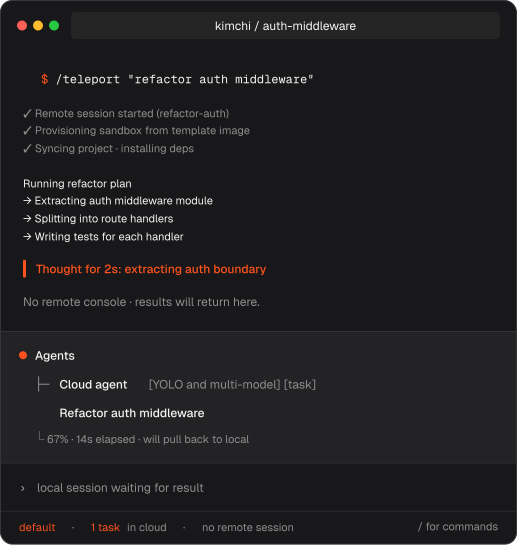
Start a remote session. Access from anywhere. Finish in your IDE.
Start a remote session
Type /teleport in Kimchi to spin up a sandbox and open a console session you can reach from any browser.
Access from anywhere
Open the Kimchi console from any browser to follow the session, or reattach on the fly with /remote-sessions — a tree of your workspaces and sessions, one Enter away. No setup, no machine tether.
Finish in your IDE
When you're back at your machine, pull changes with /sync — or run /ssh-config and reopen the workspace straight in VS Code via Remote Sessions.
Coding agents are useful. Until you're tied to one machine.
Sessions don't die
Close the laptop, lose WiFi, or restart. The agent keeps running in the cloud and you pick up exactly where you left off.
No more babysitting
Long tests, multi-step builds, and agent runs no longer need you staring at a terminal. Check in from anywhere when you want.
A real sandbox
Full autonomy in an isolated workspace. Your local repo, credentials, and system stay untouched.
When to /teleport
- Long-running work. Refactors, test suites, or builds that outlast your coffee break. Run it as a remote session and keep watching from anywhere.
- Switching devices. Start a remote session on your desktop, check status from your phone, finish on your laptop.
- Quick task offload. Hand a one-off task to the agent with
/teleport <task>and read the result when you get back. - Risky automation. Let the agent use full autonomy in an isolated sandbox, not on your main machine.
What happens in the sandbox stays in the sandbox.
Isolated from your machine
The cloud sandbox runs on Kimchi's infrastructure, not your machine. The agent can't touch your local files, credentials, or system state, no matter how hands-on it gets.
Nothing leaks out
Local SSH keys, tokens, and environment variables stay on your laptop. Only the files you choose to sync travel to the sandbox.
You control the sync
Pull changes back when you're ready. Skip gitignored files and secrets by default. Delete the workspace anytime and it's gone.