The governed AI coding platform
Give engineers autonomous coding agents without losing control of models, data, quality, or spend. Start serverless. Deploy in your VPC when ready.
curl -fsSL https://github.com/getkimchi/kimchi/releases/latest/download/install.sh | bash


'%3e%3cpath%20fill='%230E0F13'%20d='m11.014%209.826.148.56-.668.448c-.519.374-.815.822-.815%201.345%200%20.449.148.934.408%201.756l2.855%209.041%202.596-7.135-.853-2.317c-.52-1.457-1.075-2.39-1.928-3.138l.148-.56c3.449.224%206.564.224%2010.012%200l.149.56-.779.486c-.52.336-.742.672-.742%201.233%200%20.448.149.971.408%201.755l2.967%209.116%202.373-6.313c.297-.822.408-1.42.408-2.13%200-1.382-.816-2.69-2.559-4.147l.149-.56c2.484.186%204.969.186%207.453%200l.149.56c-1.632%201.494-2.633%203.026-3.746%205.94l-4.969%2013.076a30.71%2030.71%200%200%200-3.708%200l-4.116-11.245-4.08%2011.245a33.213%2033.213%200%200%200-3.856%200l-5.97-15.728c-.78-2.018-1.187-2.54-2.448-3.288l.148-.56c3.672.224%207.194.224%2010.866%200ZM42.126%2030c-6.378%200-10.42-4.11-10.42-10.349S36.008%209.303%2042.238%209.303c5.785%200%209.79%203.4%2010.383%209.04H39.234c.222%204.67%202.41%206.65%206.304%206.65%202.3%200%204.487-.746%206.193-2.054l.556.41C50.693%2027.46%2046.873%2030%2042.127%2030Zm-2.93-13.113h6.342c-.297-4.708-1.557-6.202-3.263-6.202-1.892%200-3.004%201.83-3.078%206.202Zm23.586-7.061.148.56-.667.448c-.52.374-.816.822-.816%201.345%200%20.449.148.934.408%201.756l2.855%209.041%202.596-7.135-.853-2.317c-.52-1.457-1.075-2.39-1.928-3.138l.148-.56c3.449.224%206.564.224%2010.012%200l.149.56-.779.486c-.52.336-.742.672-.742%201.233%200%20.448.149.971.408%201.755l2.967%209.116%202.373-6.313c.297-.822.408-1.42.408-2.13%200-1.382-.816-2.69-2.559-4.147l.149-.56c2.484.186%204.969.186%207.453%200l.149.56c-1.632%201.494-2.633%203.026-3.746%205.94l-4.969%2013.076a30.711%2030.711%200%200%200-3.708%200l-4.116-11.245-4.08%2011.245a33.214%2033.214%200%200%200-3.856%200l-5.97-15.728c-.78-2.018-1.187-2.54-2.448-3.288l.148-.56c3.672.224%207.195.224%2010.866%200Zm31.817-.523c6.453%200%2011.125%204.11%2011.125%2010.348%200%206.24-4.747%2010.349-11.2%2010.349C88.073%2030%2083.4%2025.89%2083.4%2019.651S88.147%209.303%2094.6%209.303Zm-3.449%209.601c0%206.277%201.113%209.639%203.597%209.639%202.003%200%203.227-1.644%203.227-8.145%200-6.5-1.113-9.638-3.597-9.638-2.003%200-3.227%201.643-3.227%208.144Zm14.982%2010.536-.148-.56%201.446-.785c1.038-.56%201.298-1.046%201.298-2.317V14.981c0-1.643-.186-2.054-1.298-2.615l-1.372-.672v-.56l1.891-.262a65.164%2065.164%200%200%200%207.342-1.495l.186.15v5.118c.927-3.661%203.004-5.38%205.451-5.38%202.151%200%203.56%201.383%203.56%203.25%200%201.869-1.298%203.101-3.041%203.101-1.594%200-2.41-.822-3.634-.822-1.335%200-2.336.748-2.336%203.587v7.435c0%201.27.259%201.756%201.335%202.279l1.557.784-.148.56a108.725%20108.725%200%200%200-12.089%200Zm27.108-10.312%204.783-4.11c.965-.859%201.335-1.344%201.335-1.942%200-.598-.333-1.046-1.446-1.83l-1.261-.86.149-.56a81.39%2081.39%200%200%200%2010.457%200l.148.56c-2.113.971-3.634%201.905-5.562%203.512l-2.855%202.39%207.453%2010.462c.742%201.008%201.447%201.569%202.559%202.13l-.148.56a96.44%2096.44%200%200%200-11.385%200l-.148-.56c1.409-.561%201.743-.86%201.743-1.346%200-.336-.149-.598-.519-1.158l-4.302-6.127-1.075.897v4.67c0%201.27.259%201.756%201.335%202.428l1.038.635-.148.56a97.067%2097.067%200%200%200-11.422%200l-.148-.56%201.446-.784c1.038-.56%201.298-1.046%201.298-2.317V5.604c0-1.644-.186-2.055-1.298-2.615l-1.372-.673v-.56l1.891-.262A62.034%2062.034%200%200%200%20133.054%200l.186.15v18.978Z'/%3e%3c/g%3e%3cdefs%3e%3cclipPath%20id='a'%3e%3cpath%20fill='%23fff'%20d='M0%200h149v30H0z'/%3e%3c/clipPath%3e%3c/defs%3e%3c/svg%3e)
'%3e%3cpath%20fill='%230E0F13'%20d='M28.201%2031.506H18.62L11.005%2021.01H8.444v10.477H-.004V.004H12.09c6.975%200%2012.671%204.719%2012.671%2010.521%200%203.542-2.183%206.706-5.496%208.639L28.2%2031.51M16.326%2010.52a5.24%205.24%200%200%200-1.537-3.73%205.297%205.297%200%200%200-3.74-1.556H8.444v10.53h2.612a5.305%205.305%200%200%200%203.72-1.542%205.245%205.245%200%200%200%201.548-3.701h.002Z'/%3e%3cpath%20fill='%230E0F13'%20d='M50.726%2019.16a12.848%2012.848%200%200%201-2.155%207.179%2012.956%2012.956%200%200%201-5.805%204.777%2013.04%2013.04%200%200%201-7.496.763%2012.996%2012.996%200%200%201-6.658-3.508%2012.879%2012.879%200%200%201-3.574-6.597%2012.833%2012.833%200%200%201%20.717-7.459%2012.915%2012.915%200%200%201%204.765-5.804%2013.024%2013.024%200%200%201%207.205-2.192c1.702-.008%203.39.318%204.965.959a12.945%2012.945%200%200%201%204.215%202.778%2012.864%2012.864%200%200%201%202.823%204.173%2012.81%2012.81%200%200%201%20.998%204.93Zm-13-6.75c-2.24%200-4.13%203.024-4.13%206.75%200%203.725%201.89%206.744%204.13%206.744%202.28%200%204.177-3.017%204.177-6.745%200-3.727-1.891-6.75-4.178-6.75Zm32.822-5.569-9.73%209.68V6.814H52.37V31.48h8.45V21.472L70.98%2031.48h10.624L68.697%2018.639l10.695-10.63v14.648c0%204.865%202.933%209.345%2010.334%209.345%203.518%200%206.734-1.983%208.3-3.774l3.801%203.256h1.799V6.841h-8.425v15.96c-.953%201.652-2.28%202.692-4.325%202.692-2.083%200-3.035-1.228-3.035-5.144V6.84H70.548Zm36.783%202.93a1.674%201.674%200%200%201-1.542-1.024%201.657%201.657%200%200%201%201.216-2.263%201.68%201.68%200%200%201%201.714.706%201.656%201.656%200%200%201-.749%202.455c-.203.083-.42.126-.639.126Zm0-3.155c-.298%200-.588.088-.836.252a1.492%201.492%200%200%200%20.543%202.71%201.509%201.509%200%200%200%201.543-.636%201.484%201.484%200%200%200-.187-1.887%201.51%201.51%200%200%200-1.063-.439Z'/%3e%3cpath%20fill='%230E0F13'%20d='M106.611%207.27h.754a.673.673%200%200%201%20.489.168.507.507%200%200%201%20.14.363.504.504%200%200%201-.402.51l.457.638h-.351l-.418-.588h-.372v.588h-.297v-1.68Zm.732.835c.22%200%20.348-.112.348-.282%200-.182-.13-.28-.35-.28h-.439v.566l.441-.004Z'/%3e%3c/g%3e%3cdefs%3e%3cclipPath%20id='a'%3e%3cpath%20fill='%23fff'%20d='M0%200h109v32H0z'/%3e%3c/clipPath%3e%3c/defs%3e%3c/svg%3e)





Prompt to PR. No babysitting required.
OSS models
Built for OSS models.
- 50+ models. Zero lock-in.
- Automatically orchestrates models by task type and cost
- Frontier OSS models via our Minimax partnership
/ferment workflow
Hand off the task. Come back to a finished PR.
A workflow that allows you to plan upfront, approve once and forget the terminal. The agent builds through each milestone autonomously, and a PR appears when it's done. Not another question.
Code session
Stay in the loop. Have more control. Make it quick.
The standard coding agent conversation powered by our open source model orchestration. Interact more closely with the agent and stir it exactly in the direction you want.
One command setup
Migrate from Claude Code. Keep everything.
On first run, kimchi setup detects existing Claude Code and OpenCode installations — MCP servers, skills, configuration — and offers to migrate in one prompt.
Evaluator
Every task is graded before it ships.
After each milestone, a high-reasoning model scores the output against the original intent, catching regressions, half-done work, and silent failures before they compound. Use Opus, Kimi, or whatever model you trust most for the job.
VS Code extension
Kimchi right inside your editor.
The extension brings the full harness into your IDE with agent sessions, model orchestration, and governance controls without leaving your editor.

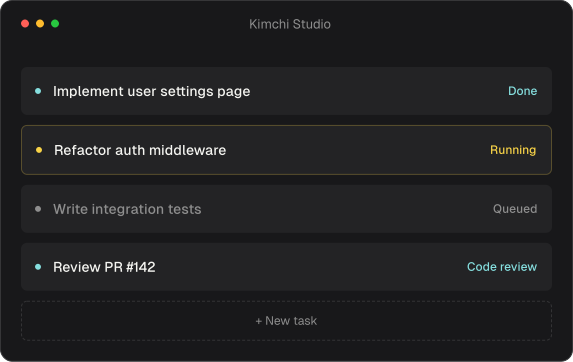
Kimchi Studio. The harness in a visual workspace.
All the power of the CLI harness inside a visual workspace. Chat with an agent to set up tasks, then watch them run in parallel. Code mode ships with terminal UI and chat UI; design mode is on the way.
- Visual task setup. Chat with an agent to define the work
- Watch tasks run in parallel from one view
- Code mode: terminal UI + chat UI
- Desktop app for macOS, Windows, and Linux
- MCP servers & Slack connector work in Studio
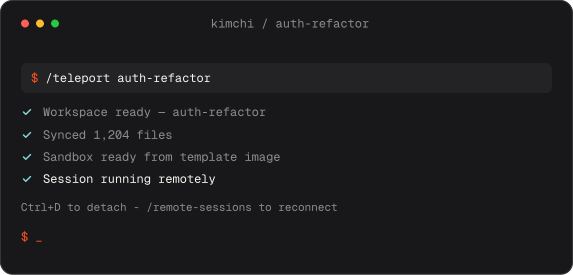
Hand off to a remote workspace. Close the laptop.
Run /teleport to hand your in-progress session to a persistent cloud sandbox, provisioned from a template image with the tools your task needs. Close the lid and the session keeps running. Reconnect via /remote-sessions or VS Code.
- Persistent sandbox keeps running when you disconnect
- Resume from the CLI, the Kimchi console, or VS Code
- Browse workspaces and sessions with /remote-sessions
- Raw SSH shell anytime with /terminal

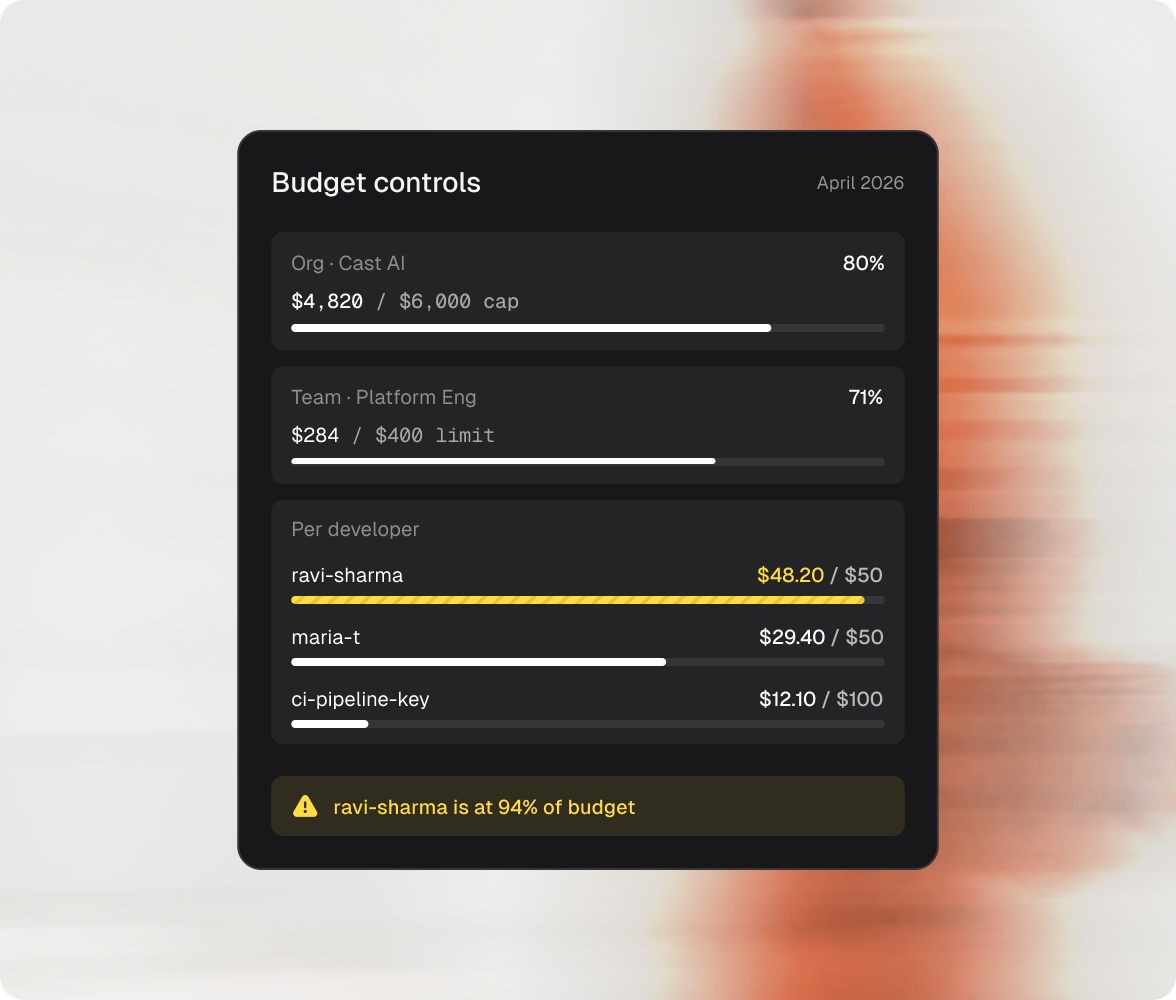
Spend limits for total ease of mind.
See exactly who, what, and where your AI spend is going. Per-developer, per-team, per-model, per-tag - in real time. Hard budget caps at every level: user, team, API key.
- Per API key set limits for CI/CD pipelines, bots, or contractors
- Per user every developer has their own budget with real-time visibility
- Per team finance gets a clean number; engineering keeps shipping
"Kimchi is fundamentally changing how our engineering team thinks about AI-assisted development. Auto router keeps the quality of a single frontier model while cutting token costs dramatically."
 Dekel ShavitSr. Director of Engineering