Keep Claude Code, Cursor and the rest of your stack. Put Kimchi's proxy in front.
Platform teams rarely win the argument about which agent engineers use, and they don't need to. Cost and control don't live in the agent, they live in the API path underneath it. Two lines and one key, and every request gets per-user attribution and a budget that holds.
Our own engineers never gave up Claude Code. What changed is the path underneath it. Their Claude Code traffic runs through Kimchi, and the Kimchi console caps each person's Anthropic spend while open models are effectively unlimited. The cap started at $400 a month. One engineer called it "like being on a diet while having a fridge stacked with ice cream." In August we cut it to $200. Last month's usage said it would touch about one in five of us.
Customers tell us the same thing from the other side. A platform lead at a 300-engineer Cursor shop put it plainly: "I don't think 300 engineers are going to put in that much effort if it's difficult."
That's the point of this post. Platform teams rarely win the argument about which agent engineers use, and they don't need to. Point Claude Code, Cursor and most other agents at Kimchi's endpoint, and every request gets per-user cost attribution and a budget that holds. Nobody switches tools.
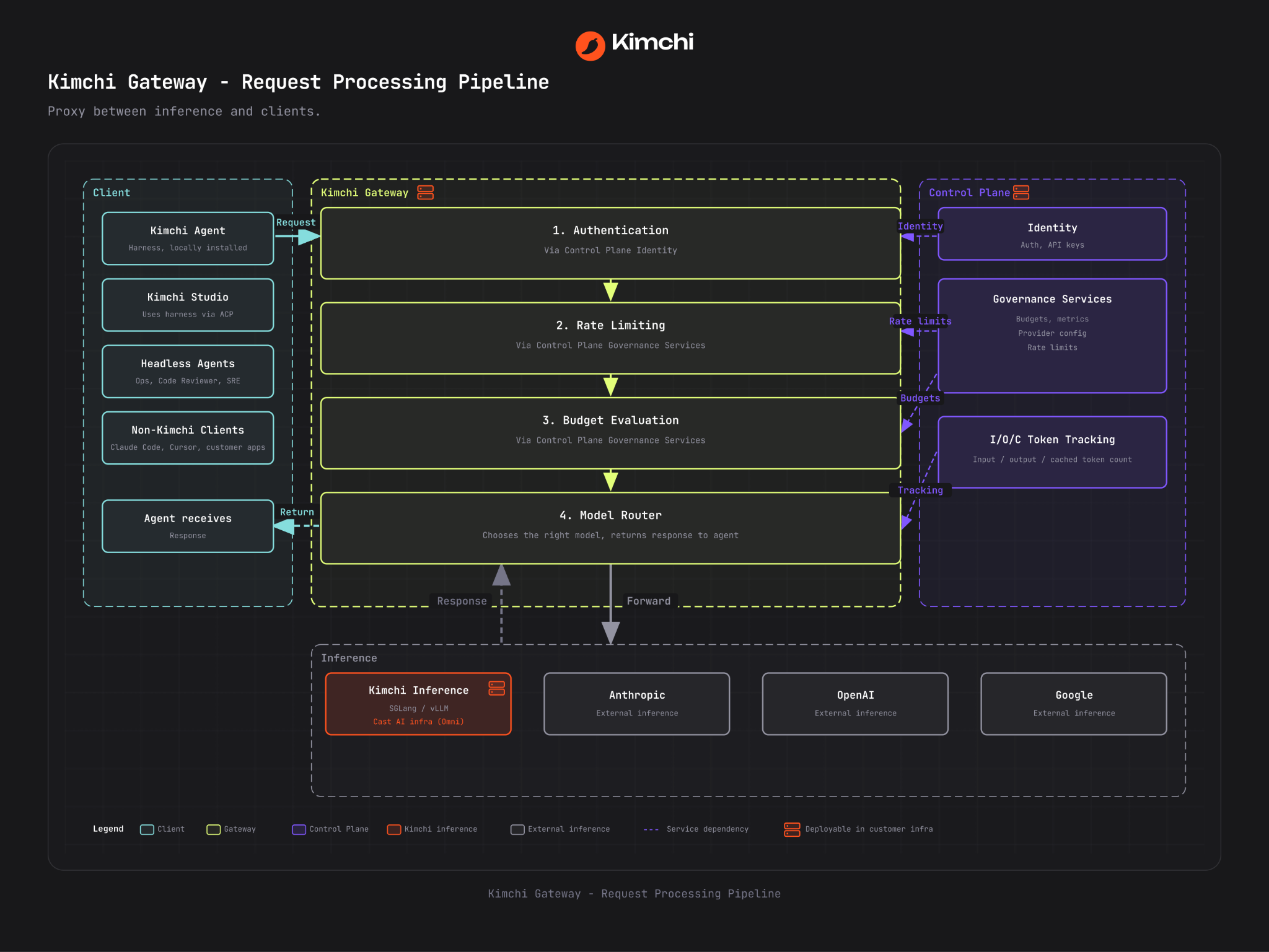
What sits in the middle
Kimchi becomes the endpoint behind the tools your team already uses. Every request that comes through is processed in four stages:
- Authentication, via control plane identity
- Rate limiting, via control plane governance services
- Budget evaluation, via the same governance services
- Model routing, which chooses the right model and returns the response to the agent
On one side: Kimchi's own agent and Studio, headless agents like Ops, Code Reviewer and SRE, and every non-Kimchi client: Claude Code, Cursor, Cline, Windsurf, OpenCode, Zed, your own apps. On the other: GLM 5.3, Kimi K3, MiniMax M3, DeepSeek, Anthropic, OpenAI, Google.
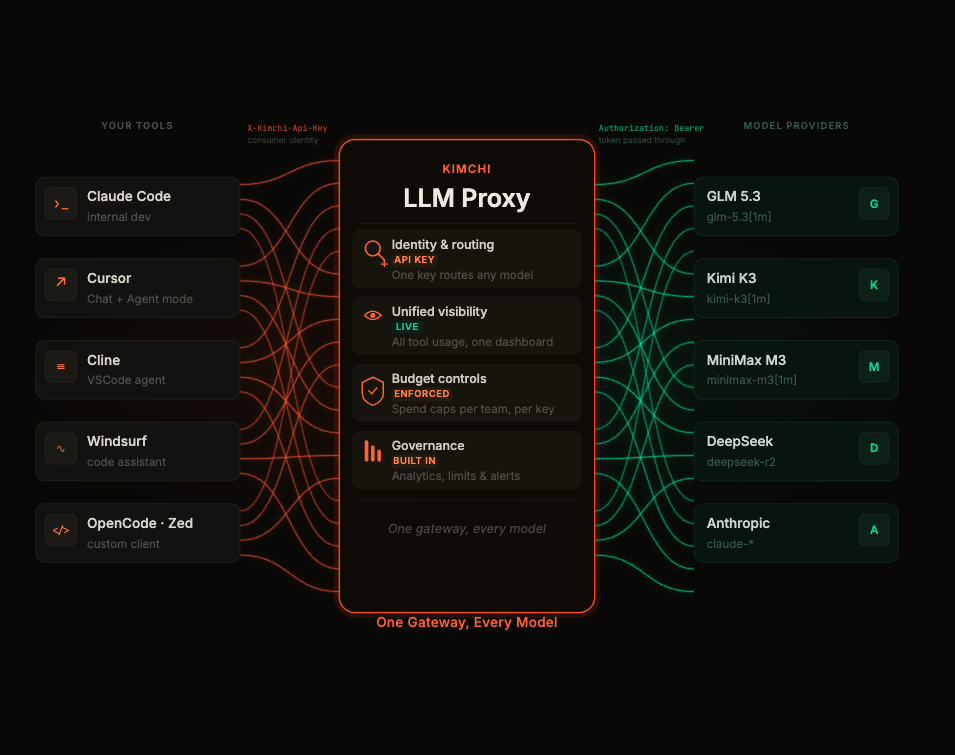
One key routes any model. All tool usage lands in one dashboard. Spend caps apply per team and per key. Analytics, limits and alerts come with it.
Set up Claude Code with Kimchi's proxy
You'll need Claude Code v2.1.242 or later. Claude Code reads its endpoint from ~/.claude/settings.json. Create an API key at app.kimchi.dev and add two lines. If the file already has an env block, add these keys to it rather than replacing it.
{
  "env": {
    "ANTHROPIC_BASE_URL": "https://llm.kimchi.dev/anthropic",
    "ANTHROPIC_AUTH_TOKEN": "YOUR_KIMCHI_API_KEY"
  }
}
Start a session. The request shows up in the Kimchi console under your key straight away.
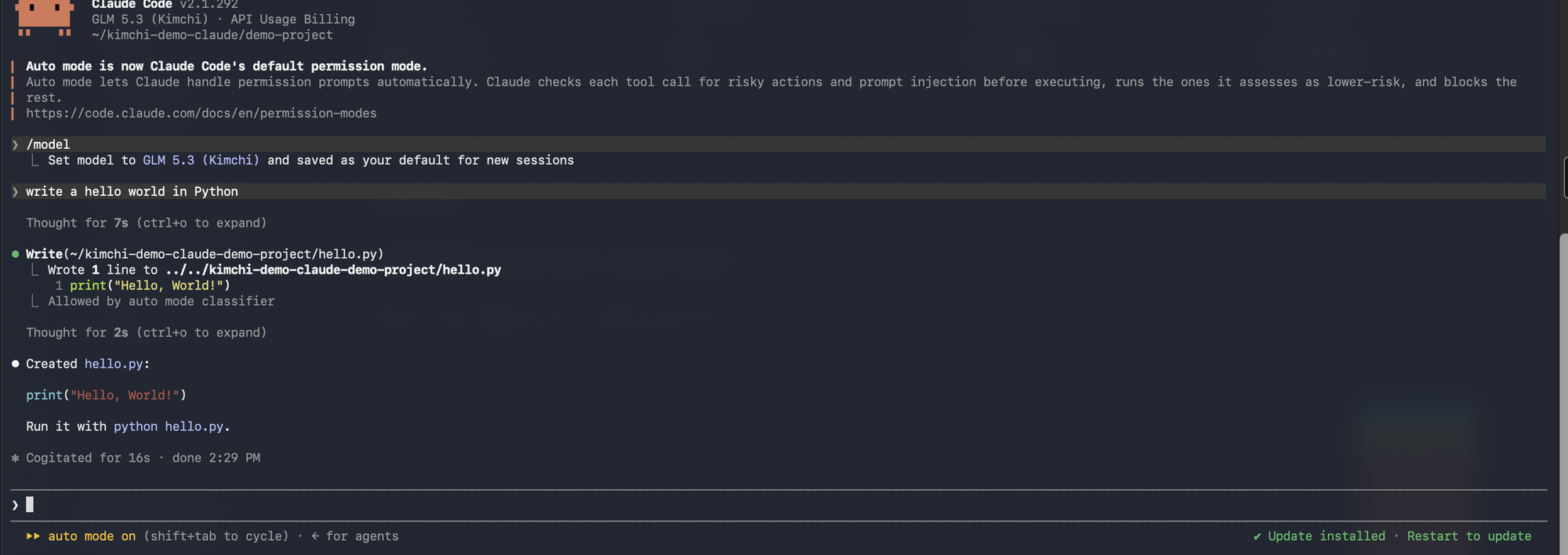
Claude Code now signs in with your Kimchi key, so it runs on API access rather than a Claude Max or Team seat. Claude chat and the desktop app stay on your existing plan.
To choose Kimchi's models from /model, add a picker to the same file:
"model": "glm-5.3[1m]",
"modelPicker": {
  "options": [
    { "model": "glm-5.3[1m]", "label": "GLM 5.3 (Kimchi)" },
    { "model": "glm-5.3-flash[1m]", "label": "GLM 5.3 Flash (Kimchi)" },
    { "model": "minimax-m3[1m]", "label": "MiniMax M3 (Kimchi)" },
    { "model": "kimi-k3", "label": "Kimi K3 (Kimchi)" }
  ],
  "replaceBuiltInOptions": false
}
[1m] tells Claude Code the model has a 1M-token context window. Claude Code strips it before the request goes out. replaceBuiltInOptions: false keeps Anthropic's models in the list next to Kimchi's.
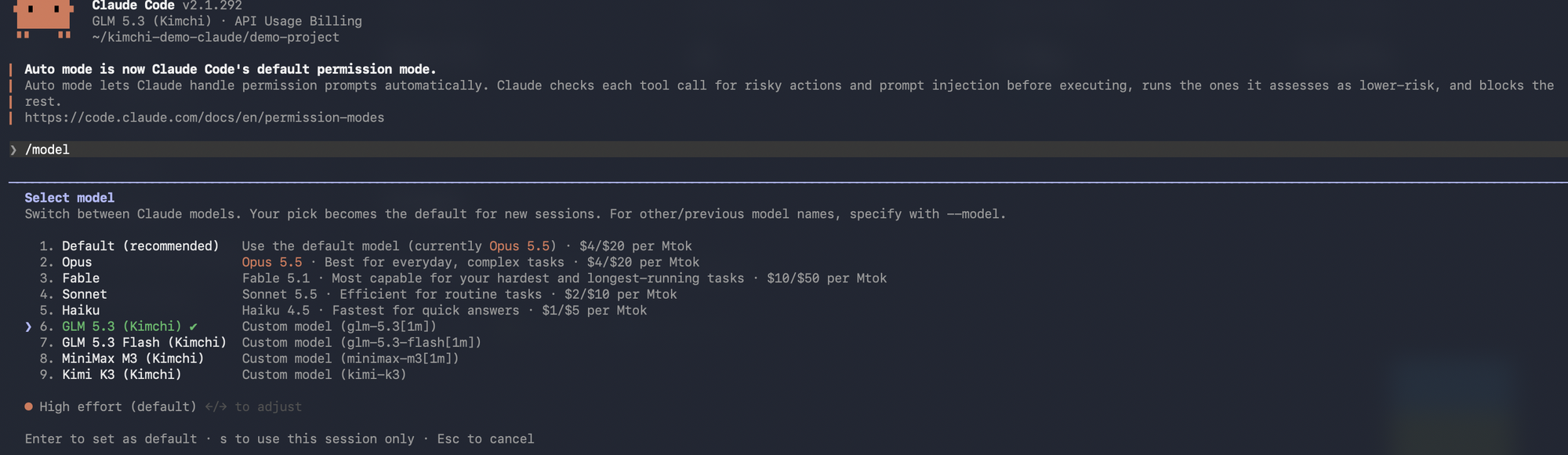
Having both in one picker is how our own engineers work: plan with Claude, build with GLM, verify with Kimi.
Your CLAUDE.md files, hooks, skills, MCP servers and the VS Code and JetBrains extensions keep working. They all read the same settings file.
Set up Cursor with Kimchi
You'll need Cursor Pro or above. The free tier can't use a custom API key. Go to Settings → Models → API Keys:
- Turn on OpenAI API Key and paste your Kimchi key.
- Turn on Override OpenAI Base URL and set it to
https://llm.kimchi.dev/openai/v1. - Add the models as
kimchi/kimi-k3andkimchi/minimax-m3. The prefix is required, because Cursor ships built-in models with the same names.
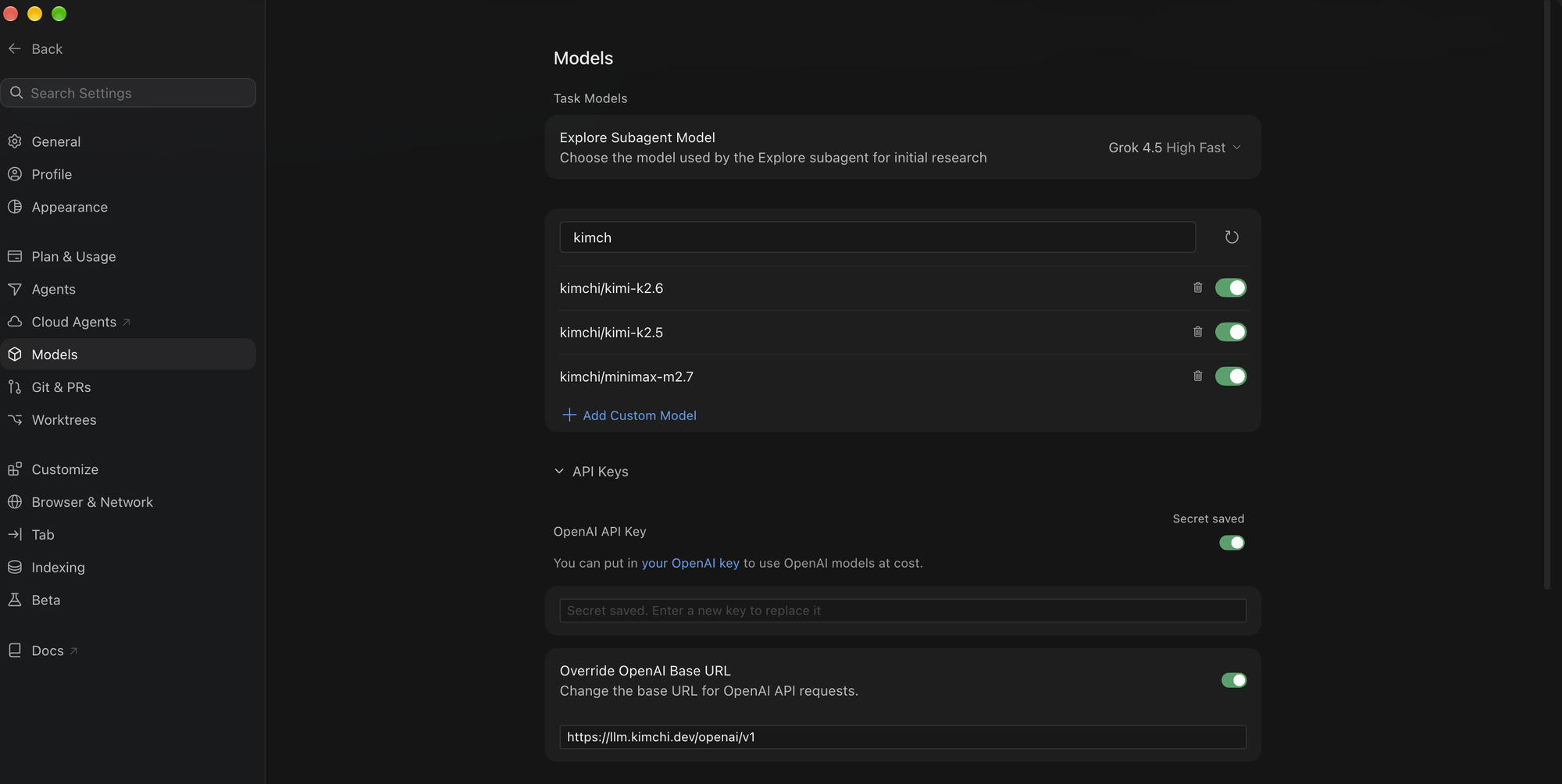
Chat and Agent now run through Kimchi, and that's where long agentic sessions spend most of their tokens. Tab autocomplete, inline edit (Cmd+K) and Composer stay on Cursor's backend and your Cursor plan. So does Cursor's own Auto mode: to route through Kimchi, pick a kimchi/model.
Two things to know. Cursor caps third-party models at 200K context, whatever the model supports. And if a model that worked yesterday suddenly returns "model not found", check the API key toggle. Cursor sometimes switches it back off.
Cost attribution, and caps that enforce
Kimchi prices every request at the proxy from the model and the actual token counts. You get spend per user, per team and per API key in real time, in one console, across every tool you've pointed at it. Developers hold a Kimchi key, never a raw Anthropic or OpenAI key, so there's one place to issue and revoke access.
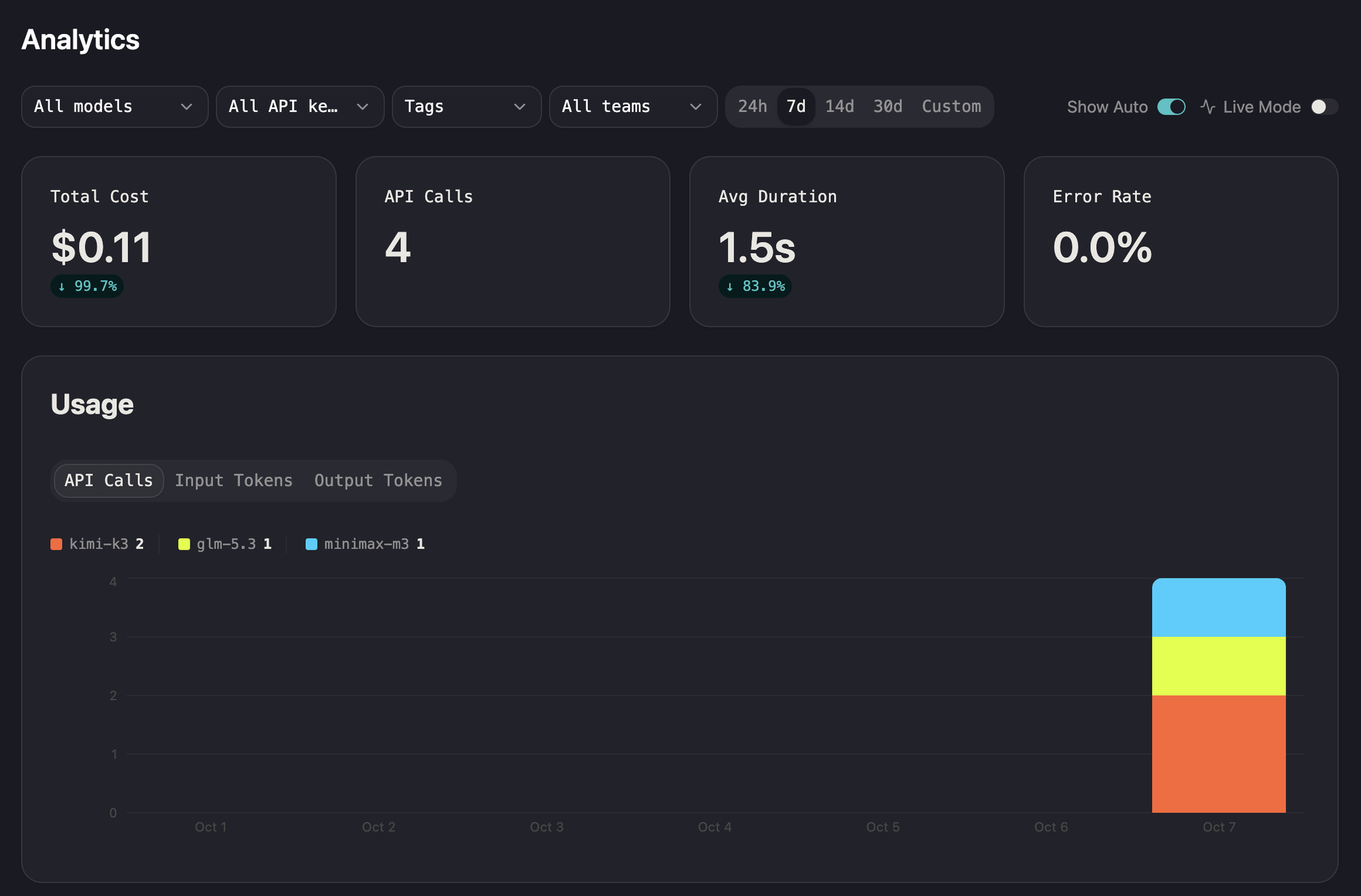
Neither tool gives you that on its own. Claude Code has no native real-time per-user attribution, so you'd build an OpenTelemetry pipeline to get it. Cursor reports requests and lines changed, not dollars, and bills in arrears.
To slice spend by project or team, tag the requests. For Claude Code:
CLAUDE_CODE_EXTRA_BODY='{"tags": ["team:payments", "project:checkout"]}' claudeAttribution tells you where the money went. Caps decide where it can go. One team we work with found an engineer had left an agent loop running overnight. It burned about $150 before anyone looked.
Budgets go on the organization, a team, a user or an API key, and on each provider separately. When one runs out, the next request doesn't execute. This is what a developer sees in Claude Code:
Error: 429 "API key has reached its spend limit.
Increase the budget in the console or contact your organization admin to continue."
Running out of Claude budget doesn't have to stop work. Set a fallback, and requests drop to an open model instead.
Want staging on a tighter budget than production? Give each environment its own key and its own cap. For more on why caps that enforce beat alerts that notify, see Assaf's post on the $500M bill.
The governance suite is the best we've seen in the market. Data sovereignty, cost observability, and budget control in one place.
Dekel Shavit, Senior Director of Engineering, Akamai
What it costs
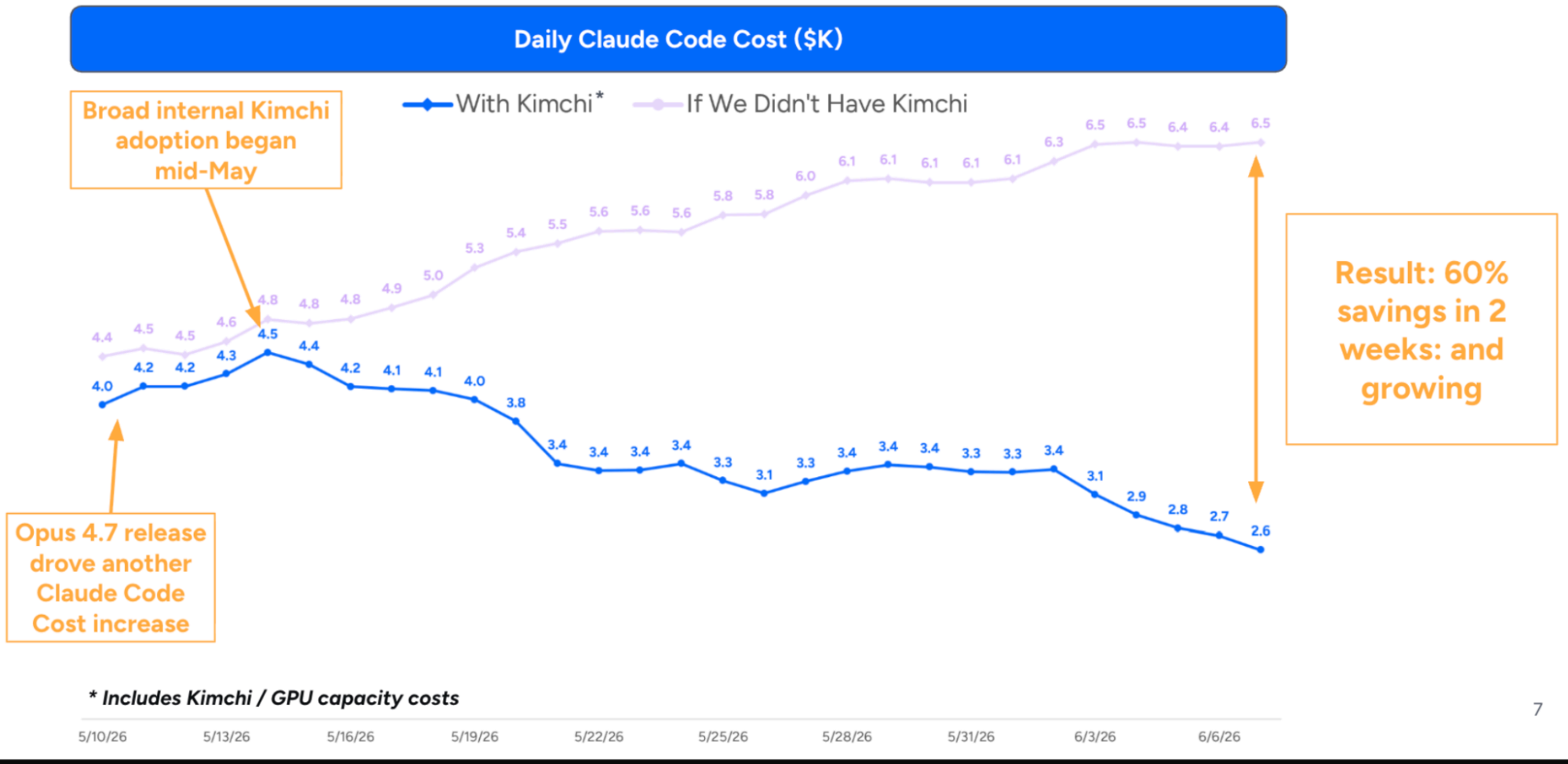
Moving Claude Code traffic onto open models is where the savings show up. Across more than 150 Cast AI developers, Claude Code costs fell about 60% in the first two weeks.
Our two-day internal hackathon ran on Kimchi's open-source models for about $4.4K. The same workload on a frontier mix (80% Claude Sonnet 5, 20% Claude Fable 5) models out at about $58K, roughly 1/13th the cost.
Traffic you keep on Anthropic, OpenAI or another provider passes through for $0.20 per million input tokens and $0.30 per million output tokens on top of the provider's price. Cached input is free. Full details on Pricing.
The rest of your stack
No migration: Kimchi becomes the endpoint behind the tools your team already uses.
| Tool | How it connects |
|---|---|
| Claude Code | Anthropic-compatible endpoint: llm.kimchi.dev/anthropic |
| Cursor | OpenAI-compatible endpoint: Chat and Agent, Pro and above |
| Codex CLI | OpenAI-compatible endpoint, or kimchi setup-tools |
| Cline | OpenAI-compatible endpoint |
| OpenCode | OpenAI-compatible endpoint |
| Continue | OpenAI-compatible endpoint |
| Windsurf | Through the Roo Code extension (Windsurf's own BYOK only takes Anthropic models) |
| Zed | Kimchi runs as a native ACP agent |
Kimchi also plugs in here:
- One-pass setup.
kimchi setup-toolsconfigures Claude Code, Cursor, OpenCode, Codex CLI, Windsurf, Zed, Cline and OpenClaw in a single run. If Cursor is open, quit it fully first and reopen it after. Docs - Kimchi VS Code extension. On the Visual Studio Marketplace, with tabbed sessions across models.
- JetBrains IDEs. IntelliJ, PyCharm, GoLand and the rest of the family run Kimchi as an ACP agent.
- Any ACP agent.
kimchi --mode acpworks in any editor that speaks the Agent Client Protocol. Docs - Your MCP servers. Jira, GitHub, GCP and the rest keep working through Kimchi.
- Code reviewer. Mention
@getkimchi reviewon a GitHub pull request or GitLab merge request. Review spend counts against the same budgets. More - Kimchi Studio. A desktop app, in early access, for people who'd rather not open a terminal. Docs
Start with Kimchi on Claude Code
Two lines, one key, one session, and the first request is in the console. Guides for every tool above are at docs.kimchi.dev/docs/setup-recipes. When you're ready to put budgets on the whole team, book a call.
Gaurang Singh is Field CTO APAC at Cast AI.