Inside the Coding Harness: Why Architecture Beats Models for AI Development
The difference between autocomplete tools and a coding harness is not the model. It's the architecture.
Most AI coding tools watch your cursor and fill in the next few tokens. These are the "autocompletes" you heard about. You accept or reject, one at a time. Good for boilerplate. Not useful for "refactor the auth layer."
A "coding agent" is the whole thing that acts in your dev environment (model + tools + loop), while the "coding harness" is the execution layer that makes that agent actually run, decide next steps, and stop.
The difference between those tools and a coding harness is not the model. It's the architecture.
Kaspar von Grünberg mapped this out in his framework of four levels of agentic software development. Level 1 is human in the loop: the model predicts what comes next at your cursor. Level 2 is humans on the loop: you give the agent a task, it plans and executes across your codebase, and you review a diff.
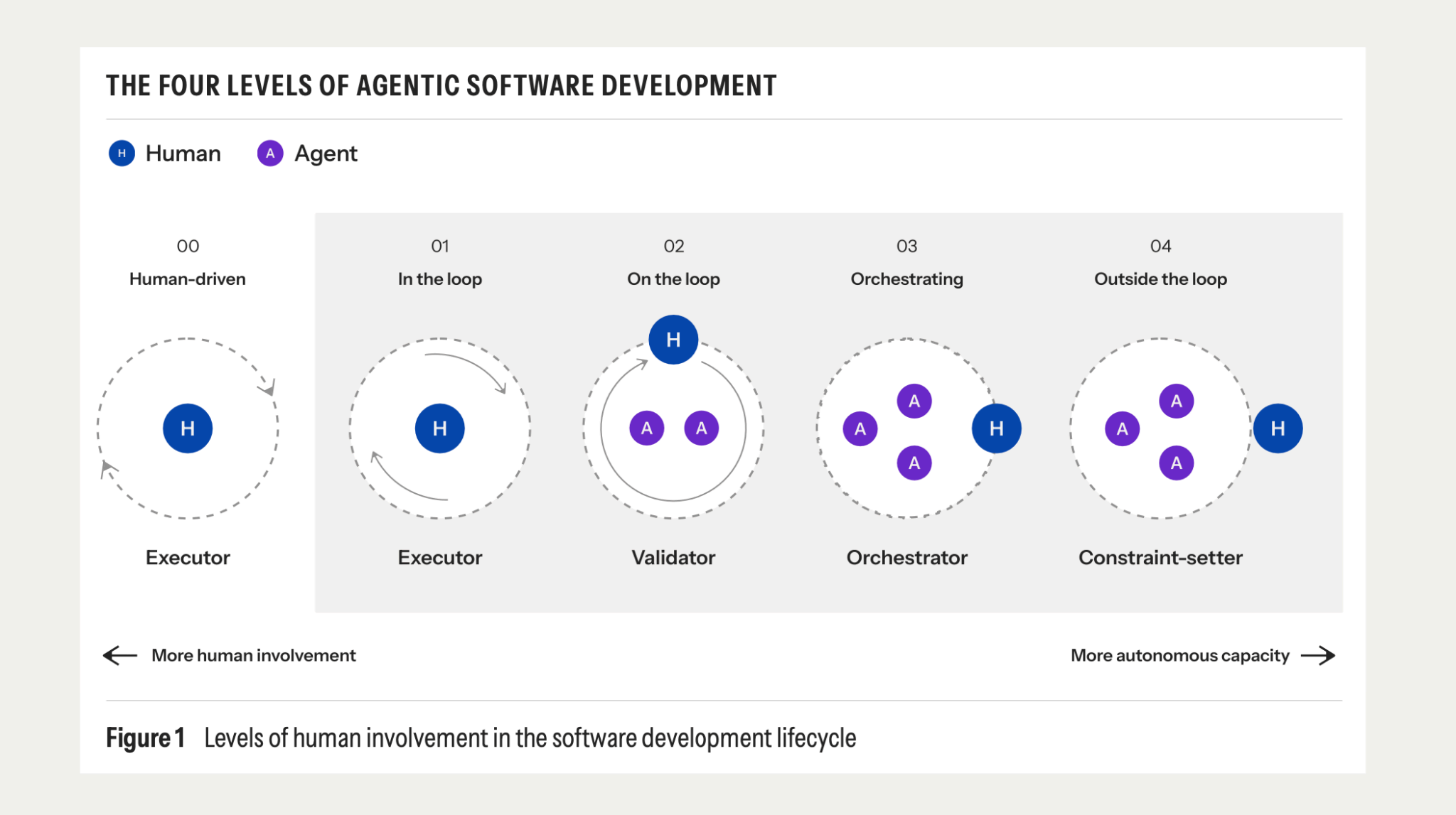
By Kaspar's definition, Kimchi Coding is a Level 2 harness. Here's what that means in practice.
What a harness actually does
When you give Kimchi Coding a task, say "add pagination to the user list endpoint, write the tests, update the OpenAPI spec," it does not send that string to one model and wait.
It runs an orchestrator that decomposes the task into phases. Planning goes to a reasoning model. Code generation goes to a fast, high-throughput executor. Review goes to a model suited to catching bugs. Codebase exploration goes to a model optimized for that. Each phase uses the right tool for the job.
Kimchi runs five model roles: orchestrator, planner, builder, reviewer, and explorer. The reasoning model that costs more and runs slower belongs in planning. A fast, cheap model belongs in bulk generation. This is not cosmetic. Sending generation tasks to a reasoning model is like using a torque wrench to drive screws.
The current routing: Kimi K2 for reasoning and planning, MiniMax M3 for bulk generation, Nemotron for codebase exploration. All on an OpenAI-compatible API, so you can swap models without rewriting your workflows.
When to use each level
Inline completion (Level 1) is the right tool when you're in flow on a focused task: a helper function, struct boilerplate, syntax you can't remember. That's what it's designed for.
A harness is the right tool when the task spans multiple files or services, when you're doing a large refactor or scaffolding a new service from scratch, and when you want tests written alongside the implementation.
The harness model only works when the task has bounded scope. "Build a user onboarding flow" is a spec.
"Make this better" is never a good task to give to an agent.
Validation also has to be automatic. If the platform doesn't run tests, security scans, and policy checks before surfacing a diff, you're just shipping bugs faster. Kimchi runs checks and reroutes failures back to the agent before it reaches you.
"Without automatic validation, you are just shipping bugs faster."
The orchestration layer is the product
The biggest misconception about AI coding tools is that the model is the product.
It's not. The orchestration layer is.
Most tools don't let you see or control model routing. That's a lock-in risk. If your agent pipeline routes everything through a single model endpoint, your velocity is coupled to that model's pricing, context limits, and rate limits.
Kimchi makes routing explicit and configurable. You see it, you control it, and you can swap models. It runs on an OpenAI-compatible API specifically to prevent vendor lock-in, or at least model family lock-in.
Where Level 2 fits
The four-level framework goes further than where most teams are today. Level 3 is continuous background agents that initiate work based on observed needs: a CVE comes out, the agent opens a PR to patch it. Level 4 is full autonomy within human-designed guardrails.
Most teams shipping AI-assisted code are oscillating between Level 1 and Level 2. Kimchi is a Level 2 tool. That's not a limitation. It's the appropriate scope for a harness that puts you in the reviewer seat on a diff, not an observer seat on a fully autonomous system.
The question for most engineering teams is not whether to adopt agentic tools. It's whether to build on infrastructure they can see and control, or black boxes they can't.
Try it for yourself
Kimchi Coding is an open-source CLI. Sign up, install it, point it at your codebase, and give it something real from your backlog.
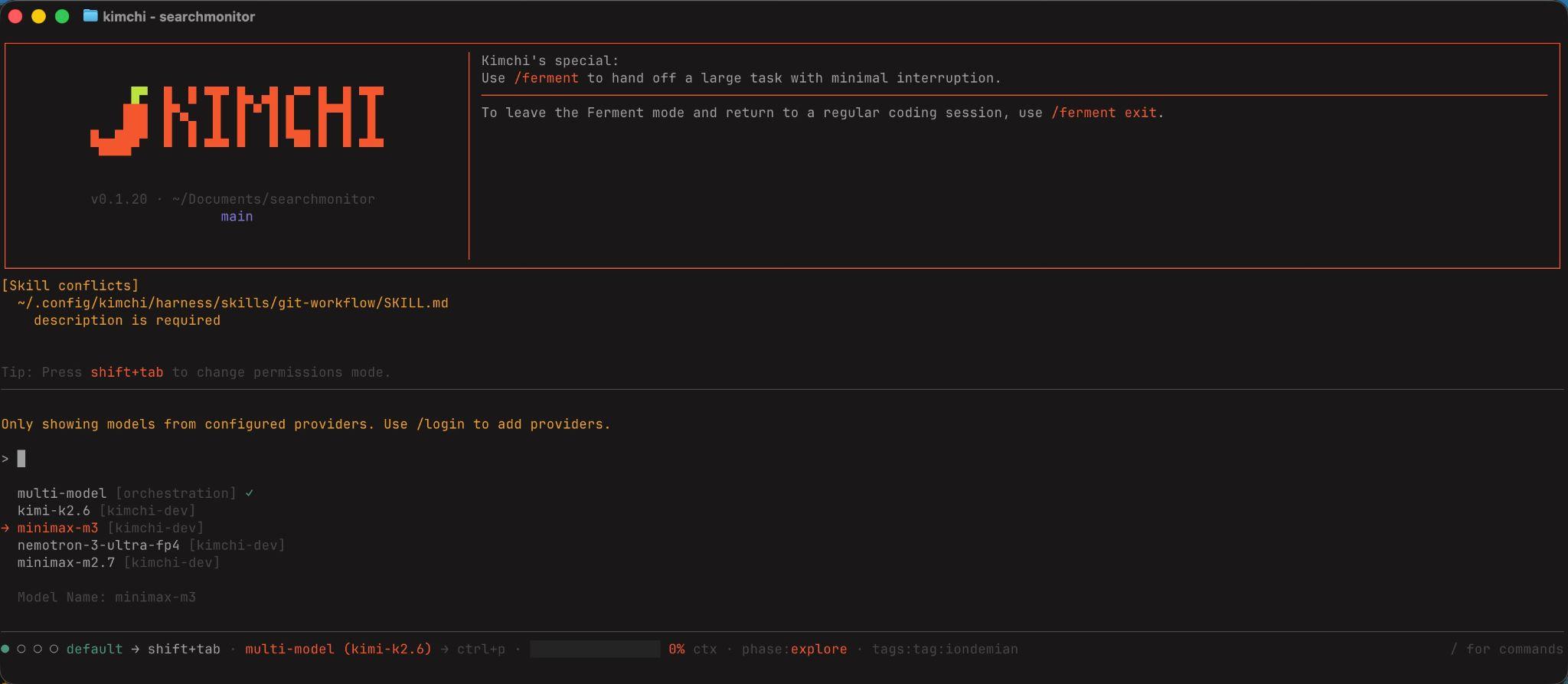
Start small: a refactor you've been avoiding, a new endpoint with tests, a migration script with the success criteria already defined. If the diff looks right, you have your answer. If it doesn't, you can inspect the routing, see which model handled which phase, and adjust. That visibility is the whole point.
The repo is at github.com/getkimchi/kimchi. The docs cover model setup, routing configuration, and worked examples from real codebases.