The best model on the leaderboard is the wrong model for your task
There are too many benchmarks, they keep breaking, and the one number they give you is the wrong number anyway. Here's why we stopped selecting models ourselves and built a router instead.
If you try to keep track of which LLM is best at coding right now, good luck. There's SWE-bench in several flavors, Terminal-Bench, LiveCodeBench, Aider's leaderboard and every provider's own eval suite. Each one publishes a table. Each table has a different model on top. The tables disagree with each other, and they disagree with what you see in your own terminal.
Model releases don't make this easier. Every few weeks a new frontier model ships, claims the top spot on three benchmarks, and the previous "best model ever" becomes yesterday's news. The half-life of a leaderboard entry is shorter than the half-life of your infrastructure decisions.
Benchmarks get discredited, months after everyone adopted them
Here's the part nobody accounts for: the benchmark you built your opinions on can stop being usable while you're still citing it.
In February 2026, OpenAI reviewed SWE-bench, found it suffers from data contamination, and recommended SWE-bench Pro as the replacement. The community obliged. SWE-bench Pro showed up in model cards, launch posts, and head-to-head comparisons across the industry.
Then in July, in the same series of write-ups, OpenAI audited SWE-bench Pro itself and estimated that ~30% of its tasks are broken: tests that are too strict and reject correct solutions, prompts that leave out requirements the hidden tests check for, tests too weak to catch incomplete fixes, and prompts that point the model toward the wrong behavior.
Their conclusion: "Given the issues uncovered in this analysis, we retract our earlier recommendation to adopt SWE-Bench Pro." And instead of naming a better alternative, OpenAI closed with the hope "that the wider evaluation community will develop new benchmarks built by experienced software developers specifically to test model capabilities."
Five months from recommendation to retraction, on the benchmark the whole field had just adopted. If your model-selection strategy is "read the latest leaderboard," your strategy has an expiry date you don't control.
The bigger problem: benchmarks average away the thing you actually need
Even a perfectly maintained benchmark has a structural limitation: it collapses a model's performance into a single aggregate number. That number tells you how a model does on average, across all tasks in the benchmark. It tells you nothing about how it does on your task.
And tasks are wildly different. Take Terminal-Bench 4.0, which is considered the most honest measure of agentic coding ability (at this moment) - 66 tasks spanning software engineering, machine learning, science, operations, security, hardware, and media. Here are the openings of two real tasks from it.
Task one:
You are provided with a region of genomic DNA representing the human ATRX locus plus sequence context upstream and downstream of it, coding region join data for the transcript of interest, a list of mutated transcript sequences, a local combined InterPro domain annotation table, and a local Ensembl VEP resource. Catalo[gue the mutations...]
Task two:
Fix the Bun/TypeScript app's production release pipeline, which currently leaks private source provenance through generated artifacts, sobun run releaseuses the client source tree and provenance policy of whatever input app is present in/appat runtime, then emits safe files under/app/dist. [...]
One task asks the agent to reason about genomics data, run variant-effect prediction, and understand protein domain annotations. The other asks it to debug a JavaScript build pipeline and reason about what leaks into production artifacts. These aren't two flavors of the same problem. They barely overlap. They reward different kinds of knowledge, different exploration strategies, different failure modes, which is good for benchmarking, but far from everyday use.
A normal benchmark gives you exactly one number per model across both. Model A: 71%. Model B: 68%. That number averages across all engineering fields - but you don't work on every problem; you just want your app to stop showing localhost.
So which model do you pick?
Because of all this, "which model should I use" has no stable answer. But you still have to answer it, every day.
You open your favorite harness. You write the prompt. And then you have a moment of pause. Which model? You remember Claude Opus was on top of the benchmark you last looked at. You also remember the Anthropic line on last month's bill. Should you pick the very best model for this task? Is this task important? Well, your job is important, so everything is important. You've been there, haven't you?
In practice one of two things happens: you just roll with the best overall model and pay premium to summarize your boss's email, or you spend minutes thinking about model choice instead of the task in front of you. Both options are bad, and you repeat it on the next prompt.
And it scales badly. One engineer guessing is a pause before every prompt. Five hundred engineers guessing is a spend line nobody can explain at the monthly review.
Wouldn't it be better if you didn't have to think about it at all?
What we do differently: per-task, not aggregate
The Kimchi router starts from a different premise. We don't ask how a model performs on a benchmark as a whole, but on your specific task.
How it works in practice. You write your prompt and hit enter, same as always. The router looks at the query - what it's actually asking for, how hard it is, what kind of work it involves - and picks the model for the job. A messy "gather what's in this directory and summarize it" goes to a cheap, fast model. A gnarly debugging session on a race condition goes to a frontier one. You don't see any of it. Your bill does.
It doesn't stop at your first prompt, either. An agent session isn't one job - it's a series of different jobs. One subagent researches a codebase, another writes the code, another writes unit tests. Naturally, the best model for each of those is different: you want the strong reasoner scoping out an unfamiliar architecture, but you don't need Opus to write unit tests. So the router picks a model per subagent too, matching each to the job it's actually about to do. Every step of your workflow gets the model it deserves - no more, no less.
Two things it doesn't do, on purpose. It doesn't shop outside your policy: the router only picks from the models your organization has approved, so your security team's allowlist still means what it says. And it doesn't hide its work: the console shows which model handled which request and what it saved, so cost attribution per user, team, and API key keeps working exactly as before. Routing changes which model answers. It doesn't change who pays, or who's accountable.
How well does it work?
We built a custom benchmark from internal CAST AI repositories and real developer problems - 93 tasks drawn from the work our teams actually do, not from a public leaderboard a model could have memorized. Every task ran through seven models: the current Claude family, GLM, Kimi, and DeepSeek. Here's every model as a point (accuracy vs. cost per task), with the router in orange:
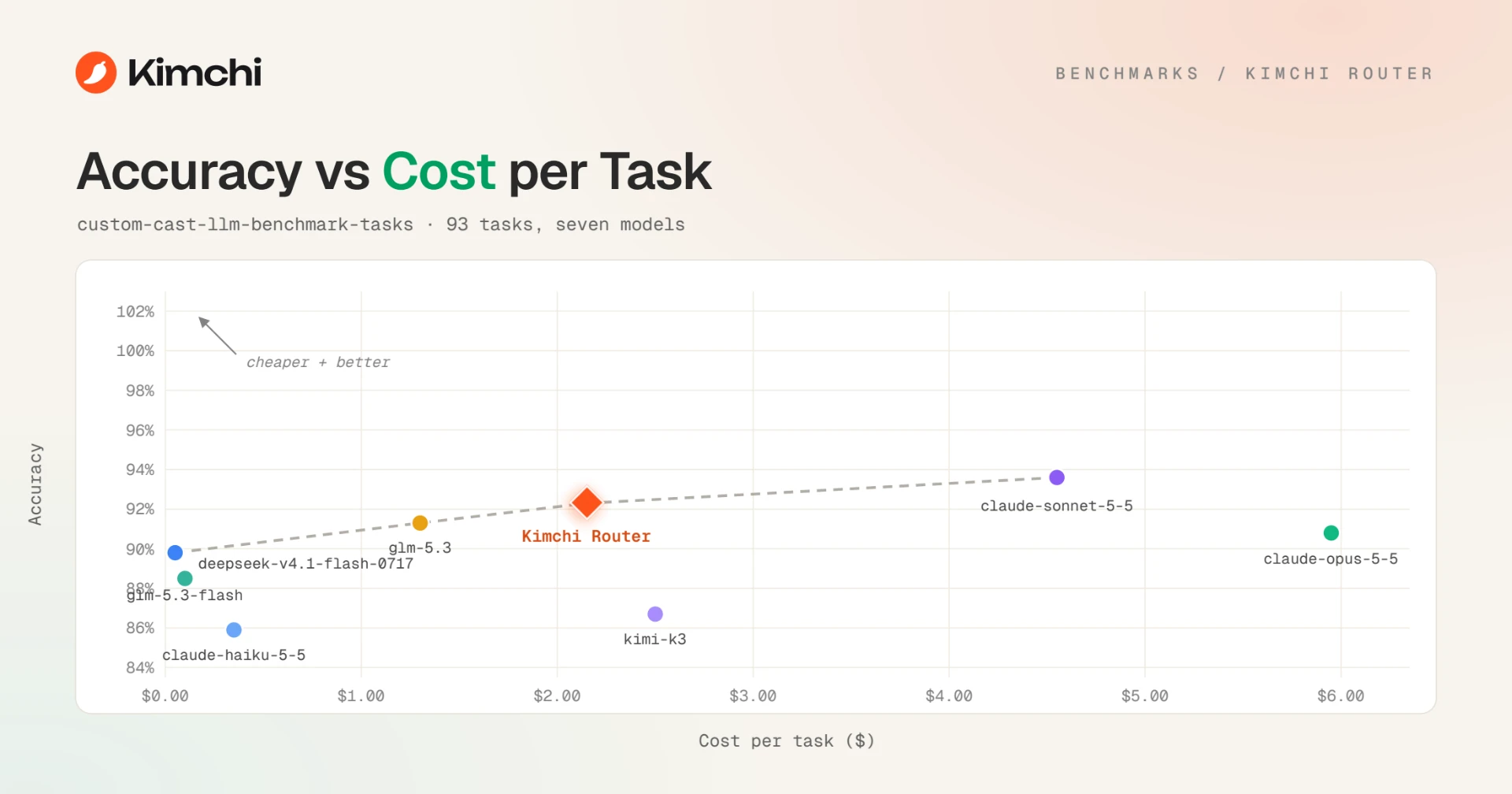
| Model | Accuracy | Cost per task |
|---|---|---|
| Kimchi Router | 92.3% | $2.15 |
| Claude Sonnet 5.5 | 93.6% | $4.61 |
| Claude Opus 5.5 | 90.8% | $5.99 |
Two things to notice.
The router sits on the Pareto front. There is no model that is simultaneously cheaper and more accurate than the router's picks. It delivers 92.3% accuracy at $2.15 per task. Claude Sonnet 5.5, the best single model by accuracy, costs $4.61 per task for 93.6%. Claude Opus 5.5 - the "just use the best model" default - costs $5.99 per task for less accuracy than the router: 90.8%.
Read that as a purchasing decision, not a leaderboard position: within 1.3 points of the best single model on the chart, for less than half its price, and ahead of the premium default on both axes.
The spread between models is the whole story. The cheapest model on the chart solves the easiest tasks at a fraction of the cost. The strongest model wins on the hard ones. No single point dominates. That's exactly the structure a router exploits, and exactly the structure an aggregate benchmark score flattens away.
Don't trust our internal benchmark? Here are the results from Terminal-Bench 4.0. The story doesn't change.
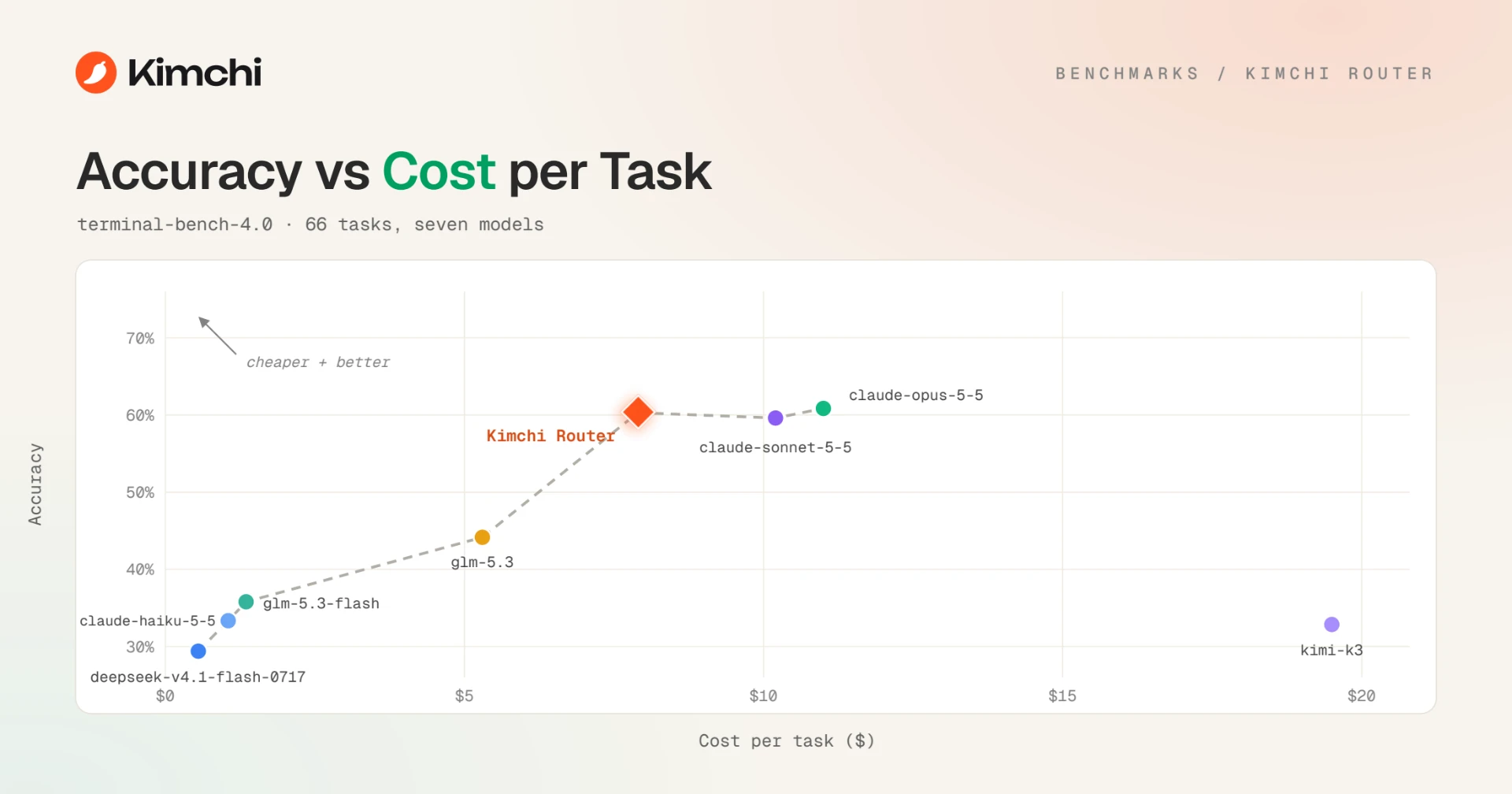
On the harder, more honest benchmark, the cheap models that looked fine on our internal tasks fall off hard, while the router stays within about a point of the best frontier models, at a lower cost per task. The aggregate score hid that spread. The per-task view is where it shows up.
We don't sell what we don't use
The router has been live inside our organization for a while now, and we keep close tabs on what it does to real spend. Running the same routed traffic on Claude Opus 5.5 would have cost 4.5 times more. Same requests, same tasks, priced at Opus list rates instead of routed. You just don't pay premium for the easy stuff.
What it does to cost per user. This is the comparison we find most telling. Our developers who enabled the router reduced their weekly spend by 45% compared to those who still pick the model themselves. Same teams, same workload, one difference: who, or what, picks the model. Multiply that across an engineering org and it stops being a nice optimization and becomes a real money saver.
The takeaway
The question "which model is best" has a different answer every month, a different answer per benchmark, and most importantly a different answer per task. Chasing it takes you away from the work that matters. The aggregate number on leaderboards was never going to tell you which model solves your problem at a price you're happy with.
The router does that job. Per-task analysis instead of aggregate scores, a decision in milliseconds instead of a pause before every prompt, and in our org, about 78% savings against the "just use Opus" baseline.
Stop picking models. That's the router's job.
Using it
Set your model to auto - in Kimchi Coding, in Kimchi Studio, or against any client that supports a custom model - and the router routes from your first prompt.
Methodology and sources
- Internal benchmark: 93 tasks drawn from CAST AI repositories and real developer work; seven models (the Claude family, GLM, Kimi, DeepSeek); accuracy scored per task, cost per task computed at list prices during the run.
- Terminal-Bench 4.0: the official 66-task set, same seven models, same scoring.
- Production figures: internal CAST AI telemetry across ~150 developers; the 4.5x (about 78% savings) compares routed traffic priced at Claude Opus 5.5 list rates; the 45% figure compares weekly spend of router-enabled developers against developers choosing their own models over the same period.
- External sources: OpenAI, "Why we no longer evaluate SWE-bench Verified" (February 2026) and "Separating signal from noise: coding evaluations" (July 2026), linked above.
- Full disclosure: Cast AI sells Kimchi, and the router picks models served through Kimchi Inference. The internal benchmark and production figures are ours; Terminal-Bench 4.0 is a public benchmark we ran ourselves. Run them on your own tasks before you believe any number, including ours.